Your guide to staying safe
Teen Chat is a place to meet people your own age and have fun. Most people here just want to talk, but it is smart to protect your privacy, know the warning signs, and know exactly what to do if something doesn't feel right.
In danger right now? Call your local emergency number: 911 in the US and Canada, 999 in the UK, 000 in Australia or 112 in most of Europe.
Need to talk to someone or report a crime? See where to get help.
- Privacy
- Warning signs
- Threats & pictures
- Bullying
- Healthy chatting
- How to report
- How we keep you safe
- How we handle reports
- Get help
- Parents
Protect your privacy
The less a stranger knows about you, the less they can use against you.
Keep personal details to yourself
Never share your full name, address, school, phone number or where you hang out. Small clues add up: a school logo, a street sign or a sports team can be enough to find you.
Choose a safe username
Pick a name that doesn't include your real name, age, birthday or location. The same goes for your profile.
Your password is yours alone
Don't share it, not even with friends. Teen Chat staff will never ask for your password, and you should only ever log in on teen-chat.org.
Think before you share a photo
Anything you send can be screenshotted, saved and passed on, and you can't take it back. If you wouldn't want your family or school to see it, don't send it.
Be careful with links and files
Don't click links or open files from people you don't know. Offers of free gold, VIP or prizes that ask you to log in somewhere else are scams.
Keep cameras for people you know
Video calls can be recorded without you knowing, and recordings can be used to embarrass or blackmail you.
Meeting up: don't meet someone you only know online. If you ever decide to, tell a parent or guardian first, take them with you, and meet somewhere public.
Know the warning signs
People who want to harm young people often pretend to be someone they're not: another teen, a modelling scout, a gaming friend. Be careful if someone:
- Asks you to keep your chats secret, or says your parents "wouldn't understand"
- Pushes you to move to another app, a private server or text messages
- Offers you gifts, gift cards, money, game credit or VIP
- Gives you lots of compliments or says you're "mature for your age"
- Asks for photos, videos, a video call or personal details
- Talks about your body, relationships or sexual things
- Tries to turn you against your friends or family
- Gets angry, guilt-trips you or threatens you when you say no
- Says they're a teen, but their story keeps changing
- Makes you feel uncomfortable, even if you can't explain why
Teen Chat is only for ages 13 to 19. If someone says they are older, or you think they might be an adult, report them. You will never get in trouble for an honest report.
If someone threatens you
If someone has a picture or video of you and is demanding money, more pictures or anything else, it is not your fault and you are not alone. What they are doing is a crime, and there is help.
- Stop replying. Don't send money or more pictures. Paying almost never makes it stop.
- Don't delete anything yet. Take screenshots of the messages, their username and their profile.
- Report them in the chat, then use Ignore so you stop seeing their messages.
- Tell an adult you trust: a parent, carer, teacher or school counsellor. They can help you report it to the police.
- Report it to the authorities. In the United States, report it to the NCMEC CyberTipline. Everywhere else, report it to your local police.
Dealing with bullying
Nobody deserves to be picked on, insulted or harassed, here or anywhere else.
Don't fight back
Replying is usually what a bully wants. Use Ignore so you stop seeing their messages.
Save it and report it
Take screenshots, then report the messages so our moderators can act.
Look after yourself
It's okay to log off. Talk to someone you trust, and if you see someone else being bullied, report it.
Healthy chatting
Chat should be one fun part of your life, not all of it.
Take regular breaks
Chat is more fun in small doses. Set yourself a time limit, and step away for a while if you notice you've been online for hours.
Get out there
Go outside, see your friends in person, play a sport, pick up a hobby or try something new. The best stories to share in chat come from real life.
Protect your sleep
Log off well before bed. Late nights on your phone leave you tired, and conversations at 2am are when people say things they regret.
Notice how you feel
If chatting leaves you stressed, upset or left out, take a longer break. You can always leave a conversation or a room that doesn't feel good.
Be kind
There's a real person behind every username. Treat people the way you would face to face, and don't join in when others pile on someone.
If it sounds too good to be true, it is
Free gifts, free VIP, prizes for clicking a link or "send me your login and I'll give you gold" are scams. Ignore them and report them.
Don't believe everything you read
People online exaggerate, joke and sometimes lie. Before you act on advice or a rumour, check it with someone you trust.
Thinking of meeting someone?
Never meet someone from online on your own. Tell a parent or trusted adult first, meet in a busy public place, and bring someone with you.
How to report a problem
You have tools in the chat to protect yourself. Use them whenever something isn't right.
- Report it. To report a chat message, tap the three dots (...) beside it and choose Report, then pick the reason that fits best. You can also report a private chat, a wall post or a profile. Your report goes straight to our moderators, and the person you report is never told who reported them.
- Ignore them. Add the person to your Ignore list so you no longer see their messages.
- Control who can message you. In your private chat settings, choose who can message you: everyone, members only, friends only, or nobody.
- Tell a moderator in the room if something is happening right now.
- Contact us through our contact page about anything else. If you are threatened or in danger, contact the police as well.
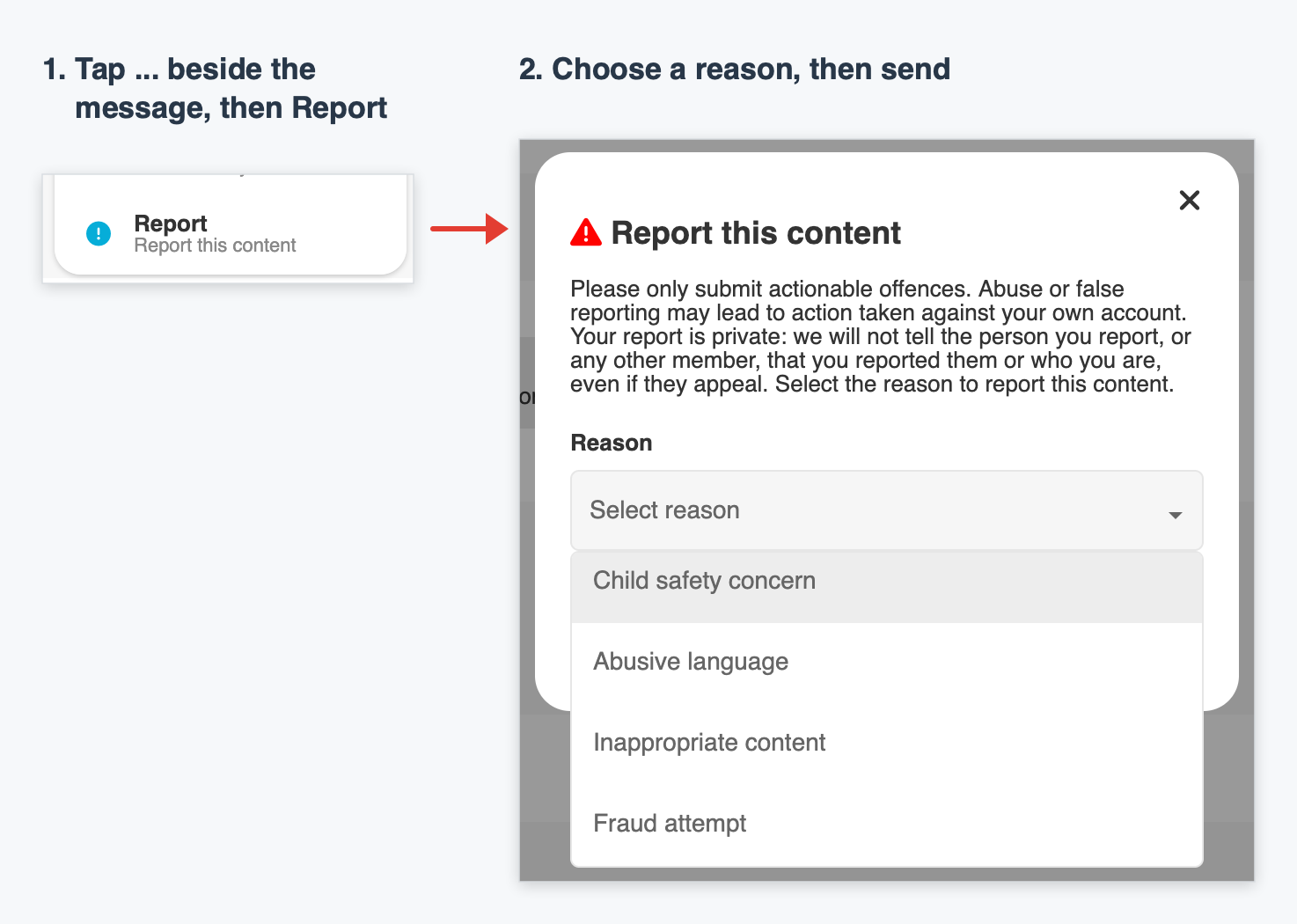
Please only report real problems. False reports take moderators away from people who need help.
How we keep Teen Chat safe
Protecting young people comes first. This is what we do, every day:
Teens only, 13 to 19
Teen Chat is only for teenagers. Anyone found to be over 19 is banned and may be reported to the authorities.
Real moderators
Our moderators enforce the chat rules, remove harmful content, review reports and ban people who put others at risk.
Automatic protection
Automated filters work around the clock against spam, offensive language and behaviour linked to grooming, such as pressuring young people to move to other apps. Some things are blocked instantly; others are flagged for our team.
Image checks
Uploaded images are automatically screened for nudity, and profile pictures are regularly reviewed and reset.
Zero tolerance for exploitation
Anyone who shares sexual content involving minors, or tries to exploit a young person, is banned and reported to the authorities.
Working with law enforcement
We cooperate with police and law enforcement agencies. If you are a victim of, or witness to, a crime, ask them to contact us.
Tools in your hands
Report, Ignore and private chat settings let you decide who can reach you.
Less data kept
Accounts with no activity for 30 days are deleted automatically.
How we handle reports
What happens after a concern reaches our team.
- A concern reaches us. A member reports a message or profile and picks a reason. Reports marked Child safety concern go to the top of our team's list. Automatic checks also run around the clock and flag behaviour linked to grooming or exploitation, even if nobody reports it.
- Our team reviews it. A moderator reviews the report. Depending on what they find, they may warn the member, kick them from the chat, ban them, or pass it to an admin.
- Serious cases are escalated. Moderators pass the case to an admin if it involves possible exploitation of a young person, grooming, threats of harm, or an adult pretending to be a teen. A moderator doesn't need an admin's permission to act. If they believe a child is at risk, they may report it themselves straight away.
- Suspected child sexual exploitation or abuse. If anyone on our team suspects a child is being exploited or put at risk, the content is removed and the account is banned. The moderator or admin reports it directly to the NCMEC CyberTipline. We don't leave it to members to report. We keep the information we're able to, and provide it to NCMEC and law enforcement to support their work.
- Someone is in danger right now. If a young person may be in immediate danger, we contact emergency services as well.
- Someone is struggling. If a member talks about hurting themselves, we don't punish them for it. We point them to help, such as the 988 Suicide & Crisis Lifeline.
- Working with law enforcement. We cooperate with police and law enforcement agencies and respond to their requests.
Get help
If you are in the United States, these services can help. Everywhere else, contact your local police.
United States
- Emergency Call 911
- 988 Suicide & Crisis Lifeline Call or text 988
- Report online sexual exploitation NCMEC CyberTipline · report.cybertip.org · 1-800-843-5678
All other countries
- Contact your local police If you are being threatened, blackmailed or abused, or you think a crime has happened, report it to your local police or law enforcement.
- In an emergency Call your local emergency number, for example 999 in the UK, 000 in Australia or 112 in most of Europe.
- Talk to someone you trust A parent, carer, teacher or school counsellor can help you get support and make a report.
For parents & guardians
Talk with your teen about who they meet online, calmly and without judgement, so they feel able to come to you if something goes wrong. Go through the warning signs on this page together and agree on simple rules about sharing photos, personal details and meeting people.
Encourage them to use Report and Ignore, and to tell you about anything that worries them. If you are concerned about a user or a conversation, contact us.
Use the free controls you already have
Every phone, tablet, console and computer has built-in parental controls, and they cost nothing: Screen Time on iPhone and iPad, Family Link on Android, Family Safety on Windows and Xbox, and similar tools on PlayStation and Nintendo. They set time limits, restrict apps and downloads, and filter websites.
Filter the whole home
Your broadband provider can block adult and harmful websites for every device in the house, usually with one switch in your account. Free family-filtering DNS services do the same thing, and most home routers have their own parental controls too. Ask your provider if you are not sure where to start.
Parents are the first line of defence. We work hard to keep this a safe place, but no website can replace a parent or guardian. We cannot see everything that happens, and we have no control over other apps, websites or what happens offline. The tools above are free, take minutes to set up, and protect your child everywhere online, not just here. Just as important, talk to your teen: children who know what to watch for, and who know they will not be in trouble for speaking up, are far safer than children who are only blocked. Please stay involved: know who your teen talks to, agree some ground rules together, and check in with them regularly. Keeping young people safe online is a shared responsibility between us, parents and guardians, and young people themselves.
Have an idea that would make Teen Chat safer?
We'd love to hear it. Contact us and we may add it to this page.